


Staff
01Payment recorded
Cash, card, or online payment where configured is logged from the patient workflow, with payment type and notes available where the team needs context.

See how each part of Medicasimple connects into one calmer clinic workflow — practical, secure, and built to make the next step feel obvious.
Explore practical answers, clinic stories, product thinking, and team context before you take the next step.
-p-3200.webp)
.webp)
.webp)
.webp)

.webp)

.webp)
.webp)
.webp)
.webp)
.webp)






















Follow a real finance journey from front-desk payment capture to owner-level reporting. Every step keeps the financial question close to the patient workflow, with setup-specific limits explained clearly.
Cash, card, or online payment where configured is logged from the patient workflow, with payment type and notes available where the team needs context.
The patient account shows what is paid or outstanding, while teams stay aware that some views can refresh on different timing.
The team can create a receipt from a payment row or start invoice actions from the payment workflow where that setup applies.
Payment plans keep agreed amounts, dates, paid status, and payment actions visible instead of buried in side notes.
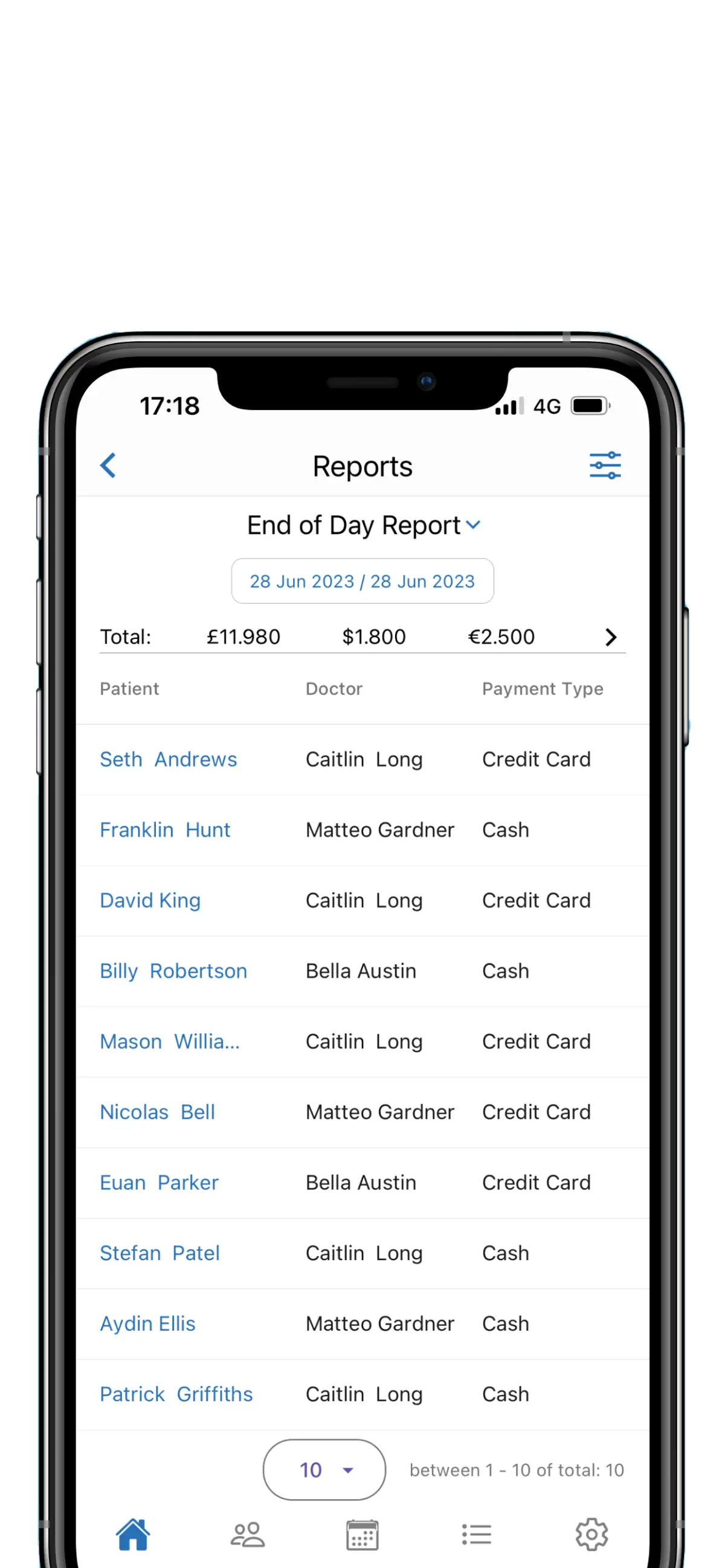
Managers review collections by date range, transaction volume, debtor follow-up, treatment-linked reports, and exports where configured.
Owners see operational finance signals beside patient and clinic activity, so the demo can focus on the exact reports your practice needs.
Payments, balances, documents, plans, debtor follow-up, exports, and collection reports stay close to the practice work they explain.
A connected finance view for owners and managers, with patient balances, receipts, invoice actions, payment plans, online setup, debtor follow-up, and collection reports shown as one operational story.
Payment entries, receipts, invoice actions, and notes stay close to the patient workflow, so staff can answer finance questions without separating them from care.
Give the front desk a quick patient balance view before payment conversations start.
Track dates, totals, paid status, and payment actions without losing the agreement thread.
Create receipts and access invoice actions from the payment workflow instead of separate folders.
Online payment setup must be configured before paid booking, deposit, and related refund workflows can be demonstrated safely.
Turn period payments into collection reports, debtor follow-up, exports where configured, and treatment-linked reporting owners can review.
Enter cash, card, refund, and payment-note details from the patient finance workflow, then create a receipt or start an invoice action where the setup applies.
Check patient balances before front-desk conversations and identify debtor follow-up without waiting for a month-end spreadsheet.
Create receipts from payment rows and use invoice workflows where configured, so patient finance documents are easier for staff to locate.
Review collected amounts by period, transaction volume, debtor follow-up, instalment status, treatment-linked reporting, and exports where configured.
Book a demo to see how Medicasimple connects patient balances, payment rows, receipts, invoice actions, payment plans, debtor follow-up, and collection reports in the same operational workflow.
Check paid and outstanding balances from patient activity
Create receipts and start invoice actions from payment workflows
Follow instalments, refunds, payment notes, and update history
Review collections, debtor follow-up, exports, and treatment-linked reports
Quick answers about payments, balances, documents, reports, and finance setup in Medicasimple.
Medicasimple is dental practice management software with operational finance workflows built in. It helps teams track patient balances, payments, receipts, invoice actions, payment plans, and collection reports. Use your accounting system for statutory accounting, tax, and formal bookkeeping.
Yes. Medicasimple supports patient balance visibility from treatment and payment activity, with debtor follow-up views that help teams identify patients who need payment attention.
Yes. Collection reporting supports date-range review, period views, collected amounts, and transaction volume. Exports are available where configured.
Yes. Medicasimple supports treatment-linked reporting based on completed treatments and received payments, so owners can review finance activity beside the care that generated it.
Relevant reports can be exported where configured, so managers can continue deeper analysis outside Medicasimple when the practice needs it.
Yes. Debtor patient views and patient segmentation can help practices find outstanding balances and organise follow-up.
Finance gets clearer when the surrounding clinical, diary, reporting, and booking workflows stay connected.
Open the demo modal and walk through patient balances, payment entries, refunds, receipts, invoice actions, payment plans, debtor follow-up, collection reports, exports, and online payment setup with your exact practice scenario.