


March 2026 Product Updates
March updates focused on stronger appointment flows, clearer finance workflows, treatment planning controls, inventory reporting, and the renewed Medicasimple Mobile 2.0 experience.
In March, we released a broad set of Medicasimple updates across appointments, finance, treatment planning, inventory, reporting, and the mobile experience.
🚀 New Features
🎉 Online Appointment Payments
Online appointment flows can now include a payment step. Clinics can manage deposits or appointment payments more directly during booking.
What it helps with
Booking and payment can happen in one connected flow, giving teams a more controlled appointment experience and clearer collection process.

🎉 AM/PM Calendar Display
An AM/PM time format option has been added to the calendar. This gives teams that use this format a clearer way to follow the daily schedule.
What it helps with
Clinics can adapt the calendar view to the time format their team is already used to.

🎉 More Detailed Permission Controls
Appointment, task, appointment status, and invoice permissions are now more granular.
What it helps with
Clinic managers can define team roles more clearly and control who can take specific actions across daily workflows.


🎉 Mobile Barcode Scanning Support
Mobile inventory workflows now support a wider range of barcode formats, including Data Matrix, GS1, and standard barcode types.
What it helps with
Stock teams can complete inventory actions faster with less manual entry.
✨ Improvements
✨ Simpler New Clinic Setup
New clinic creation now starts from the country selection. Language, timezone, and currency defaults are applied more consistently from the country-based setup.
What it helps with
New clinics can be configured faster and with fewer manual setup steps.
✨ Stronger Locked Treatment Plan Controls
Locked treatment plans now have stronger controls around doctor changes, list prices, active status, and completion dates.
What it helps with
Approved treatment plans stay more consistent after they are locked.

✨ Improved Patient Group Reporting
Patient group reports now include total treatment count, total paid amount, group types, and richer export fields. Totals are also easier to review.
What it helps with
Clinics can analyze patient groups more clearly across both operational and financial views.

✨ More Complete Inventory Exports
Inventory movement and inventory request exports now include barcode information. Patient-related stock outputs also show patient information more consistently.
What it helps with
Stock tracking and retrospective checks are easier to complete.

✨ Clearer Invoice and VAT Workflows
Bulk VAT updates and invoice item grouping have been improved, with items organized by treatment plan and procedure.
What it helps with
Invoices are easier to read, and finance teams can manage bulk updates more efficiently.

✨ Improved Multi-Clinic Patient Workflows
Patient merging, balance calculations, and patient timeline records are more consistent across multi-clinic environments.
What it helps with
Teams working across multiple locations can follow patient information with more confidence.


✨ Better Notification Routing
Tapping a notification now routes users to the relevant screen more consistently.
What it helps with
Teams can move from notification to action faster.

✨ Mobile Daily Workflow Improvements
The mobile app received improvements across payments, expenses, payment plans, stock forms, patient editing, reports, appointment creation, long notes, payment details, and end-of-day filters.
What it helps with
Teams can complete more daily clinic work from mobile without returning to a desktop.
🛠️ Fixes


🛠️ Finance View Consistency
Resolved selected display issues across patient expenses, income and expense colors, account balance colors, financial report permissions, payment notes, and receipt fields.
🛠️ Appointment and Calendar Fixes
Resolved selected issues affecting recent appointments, cancelled appointments, working hours, past appointments, and appointment status flows.
🛠️ Treatment Planning Fixes
Improved stability in selected treatment plan, proforma, deleted lab connection, stock-linked treatment, and surface-selection scenarios.
🛠️ Messaging and Notification Fixes
Resolved selected inconsistencies across SMS, email templates, contact log records, and mobile notification behavior.
🛠️ Healthcare Integration Flow Fixes
Healthcare integration flows are now more reliable across patient record, routing, and submission steps.
📱 Medicasimple Mobile 2.0
With this update, the Medicasimple Mobile App has been completely rethought, and the role of mobile within the clinic has been redefined.
Previously, the mobile app was mainly used for checking information or quick lookups. With this new version, workflows move much faster on mobile. We’ve built a structure that allows you to continue your day without going back to your computer, enabling truly active use in the field. Let’s take a closer look at what’s new. 👇
✨ A Completely Redesigned Calendar Experience
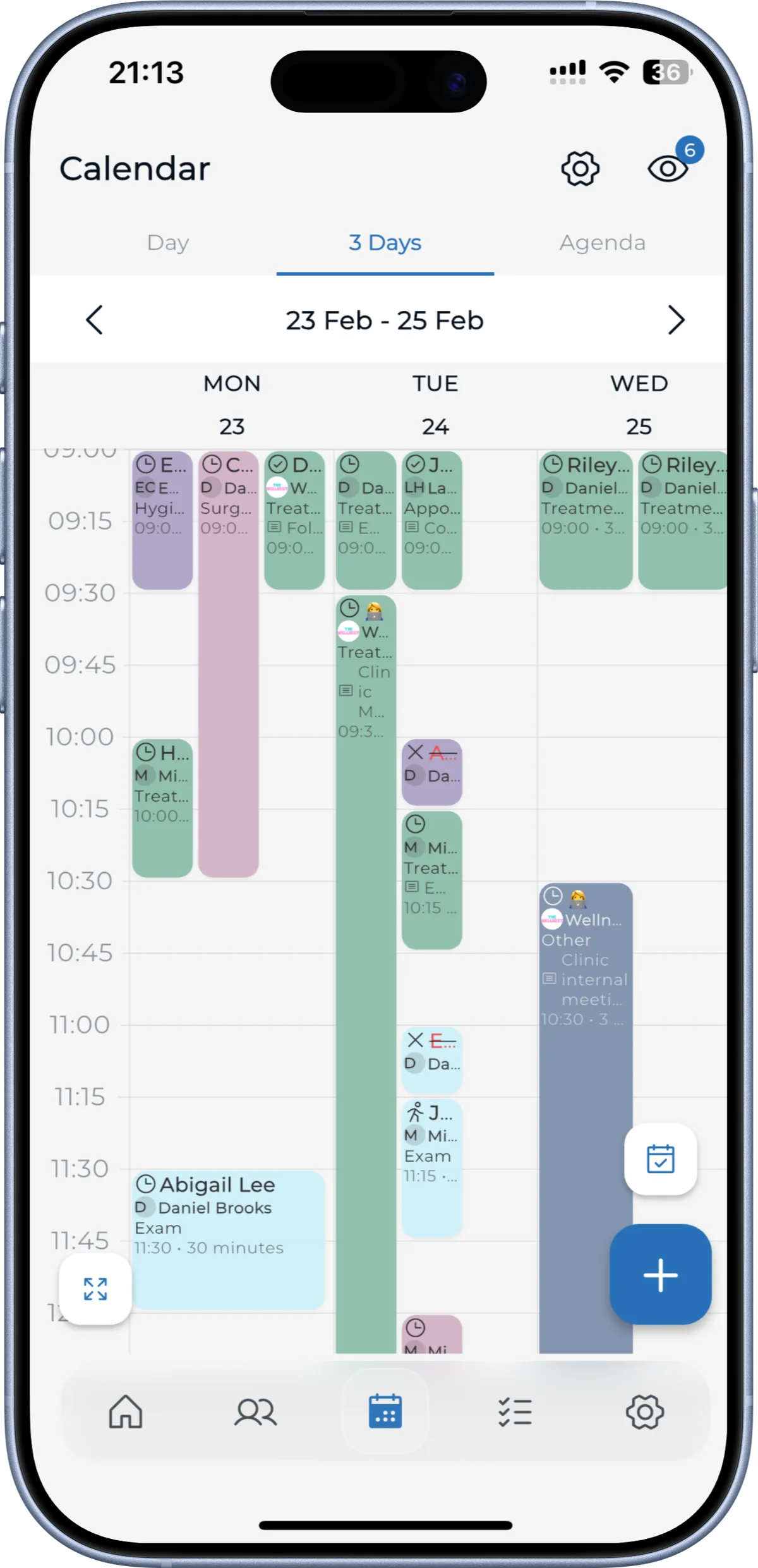
The calendar is one of the biggest upgrades in this release. The entire infrastructure has been rebuilt, resulting in a noticeable boost in speed during daily use.
You no longer need to navigate through multiple screens to manage appointments. With drag-and-drop, you can simply move appointments to any time you want. It may seem like a small change, but it makes a big difference on busy days.
With the doctor-based view, everyone can focus only on their own schedule. Full-screen mode and zoom options allow you to easily switch between a detailed hourly view and the overall flow of the day. You can now also customize working hours directly from the mobile app.
✨ Smarter, Action-Driven Notifications
Notifications are no longer just reminders. They now help you take action.
When you tap on a notification, it takes you directly to the relevant screen. No searching, no navigating through menus. This flow, used multiple times throughout the day, saves more time than you might expect.
✨ Patient Expenses and Inventory Management
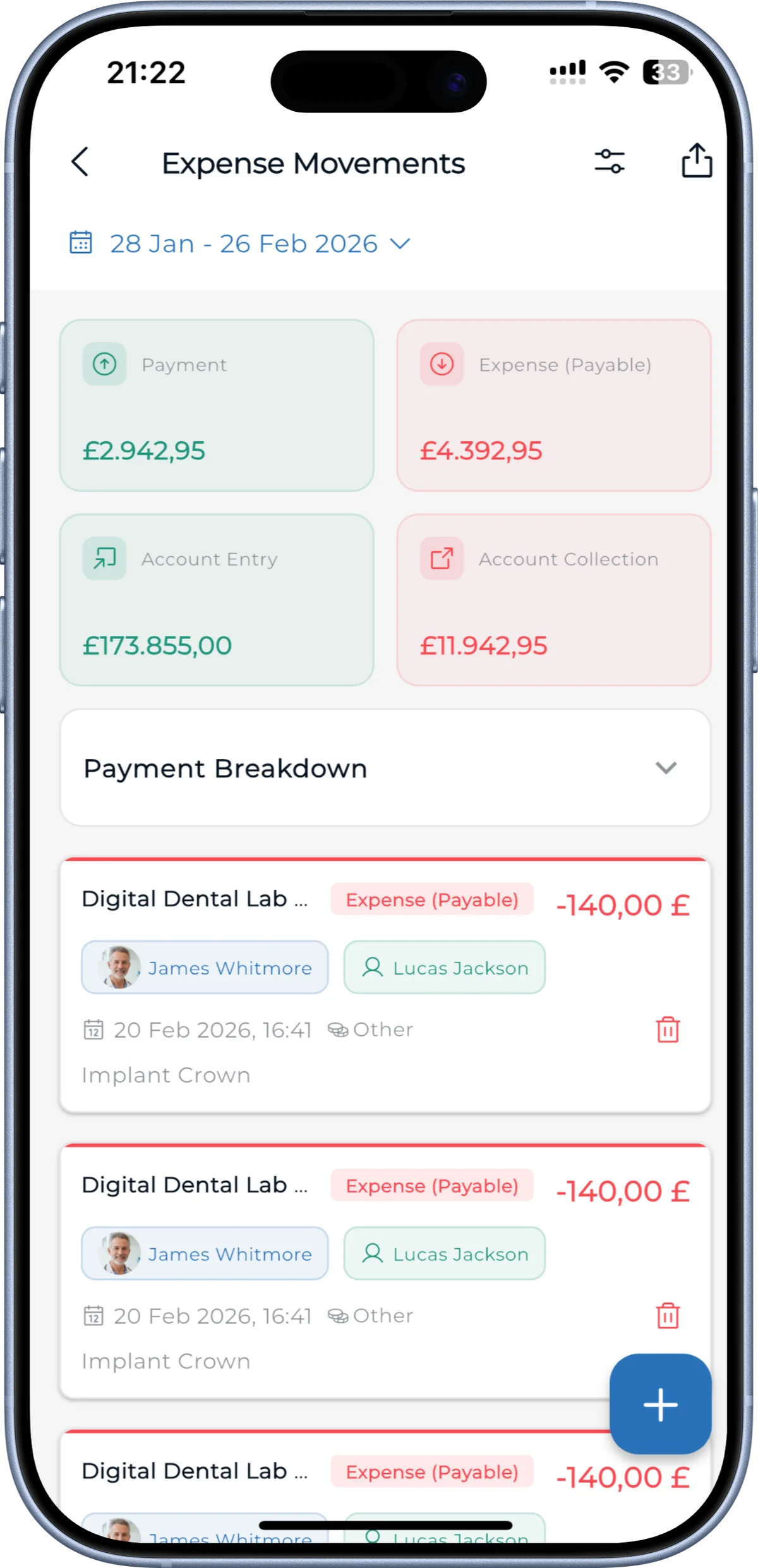
With the latest update, you can now add patient-based expenses, check stock levels, and track product movements directly from mobile.
This removes the need to constantly return to your computer while moving around the clinic, creating a much smoother experience for the entire team.
✨ Financial Tracking on Mobile
Financial tracking is now fully available on mobile. 🥳
You can view patient-based financial movements and monitor income and expenses without going back to your desk. It’s now easy to quickly check your clinic’s financial status throughout the day and stay on top of what’s happening in real time.
Especially on busy days, this helps you instantly review things you would normally leave for later.
✨ Fast and Error-Free Operations with Barcode
One of the most important updates on the inventory side is Matrix barcode support.
You can now scan products, such as implants, to perform actions instantly. This reduces the need for manual entry and minimizes errors.
Products used during treatment are automatically deducted from stock when scanned.
✨ Reports, Now in Your Pocket
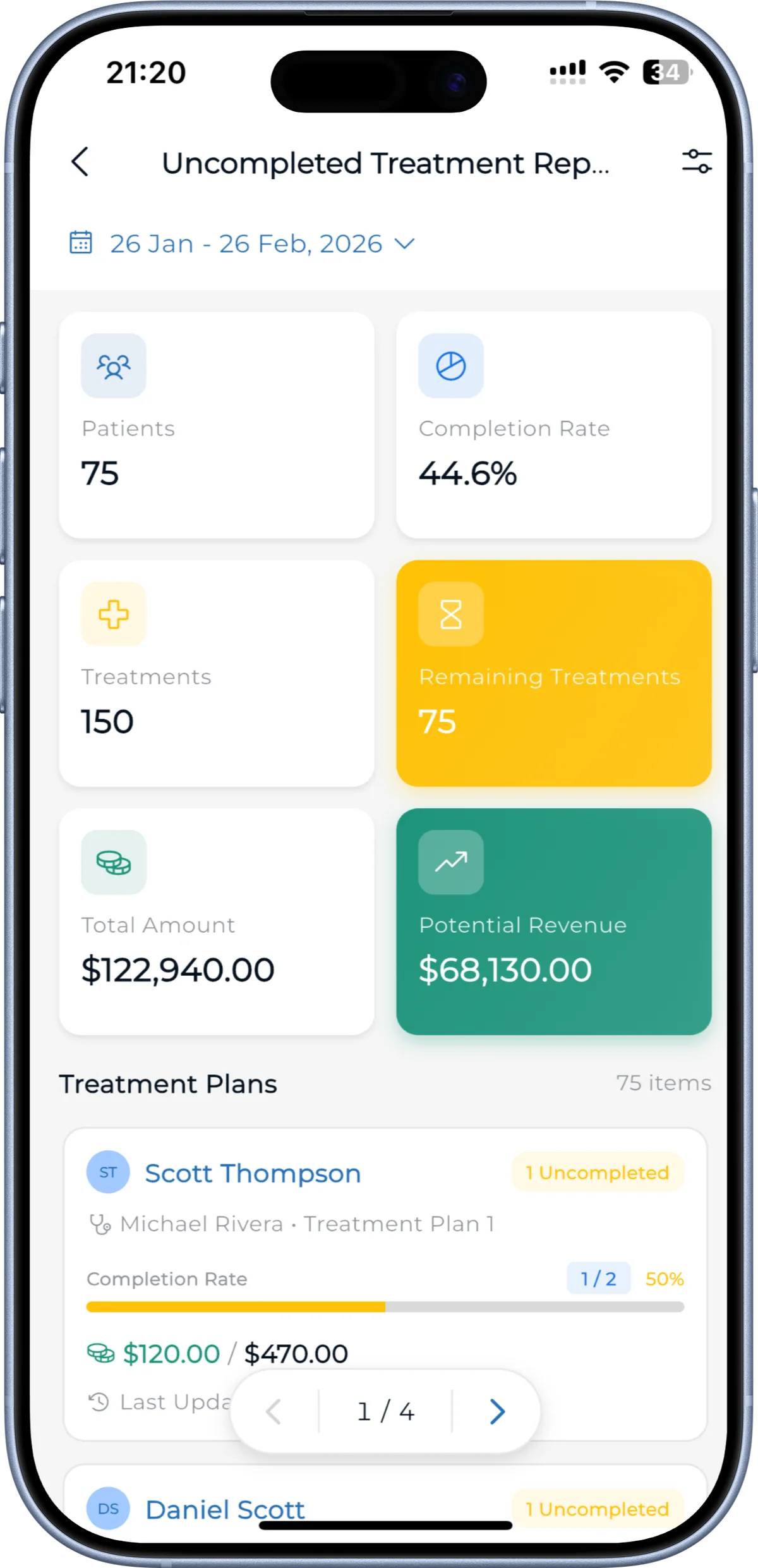
Reporting has been expanded, and all performance and earnings reports are now available on mobile.
You can track clinic performance, treatment processes, and financial data directly from your phone, reducing the need to return to your desk just to make decisions.
✨ Visual Communication, Made Easier
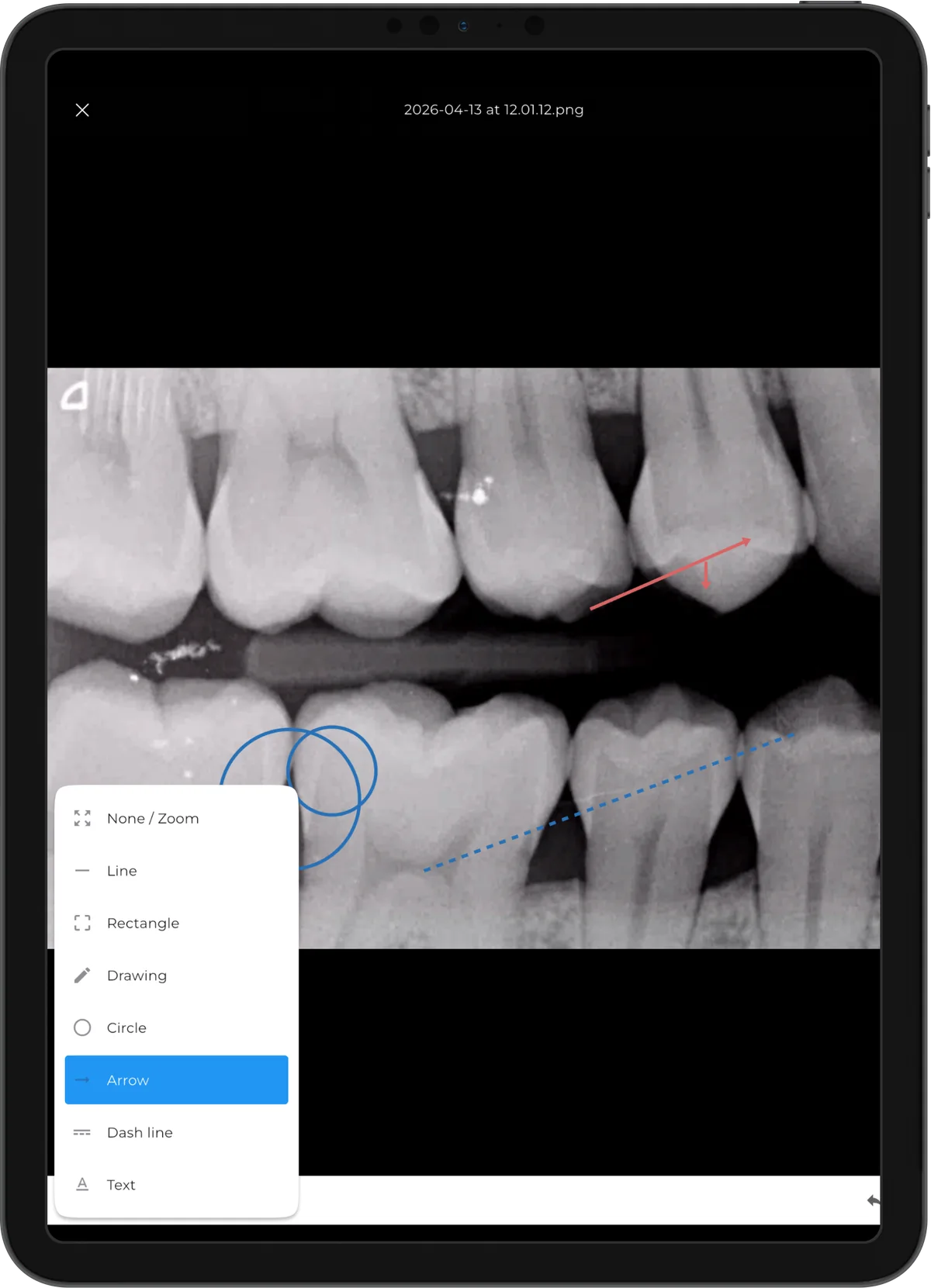
Mobile is no longer just a viewing tool. It’s now a powerful way to communicate.
You can draw directly on X-rays and patient images. This experience feels especially smooth and natural on tablets. Showing and explaining treatments visually to patients, and guiding them through decisions, is now much easier.
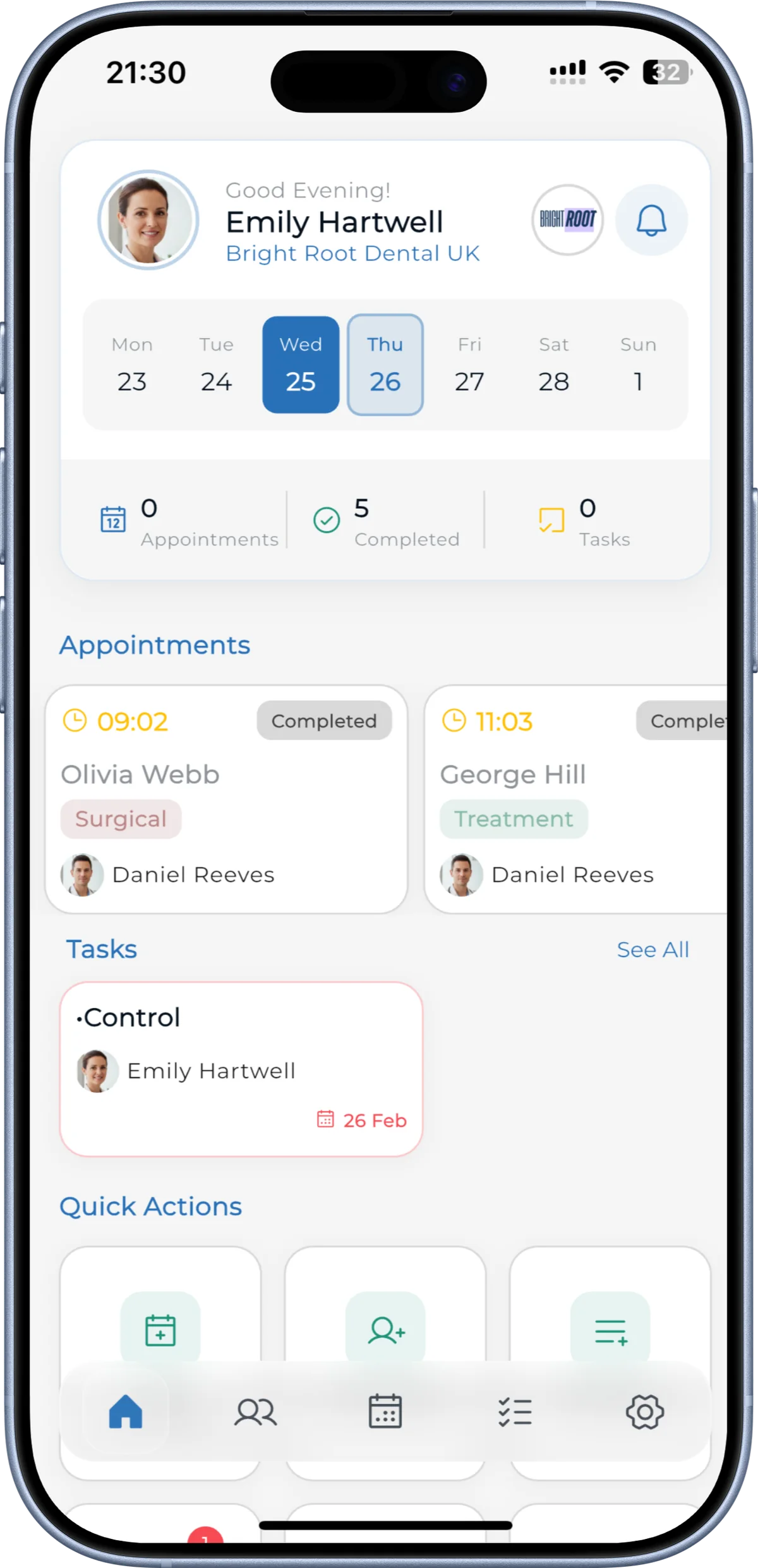
✨ A Completely New Home Screen
Now, when you open the app, you see exactly what you need.
Daily appointments, tasks, and the overall flow are all in one place. You can take action quickly without getting lost in the app.
✨ Faster and More Secure Login
Biometric login is now available.
You can securely access the app using your fingerprint or facial recognition for a faster login experience.
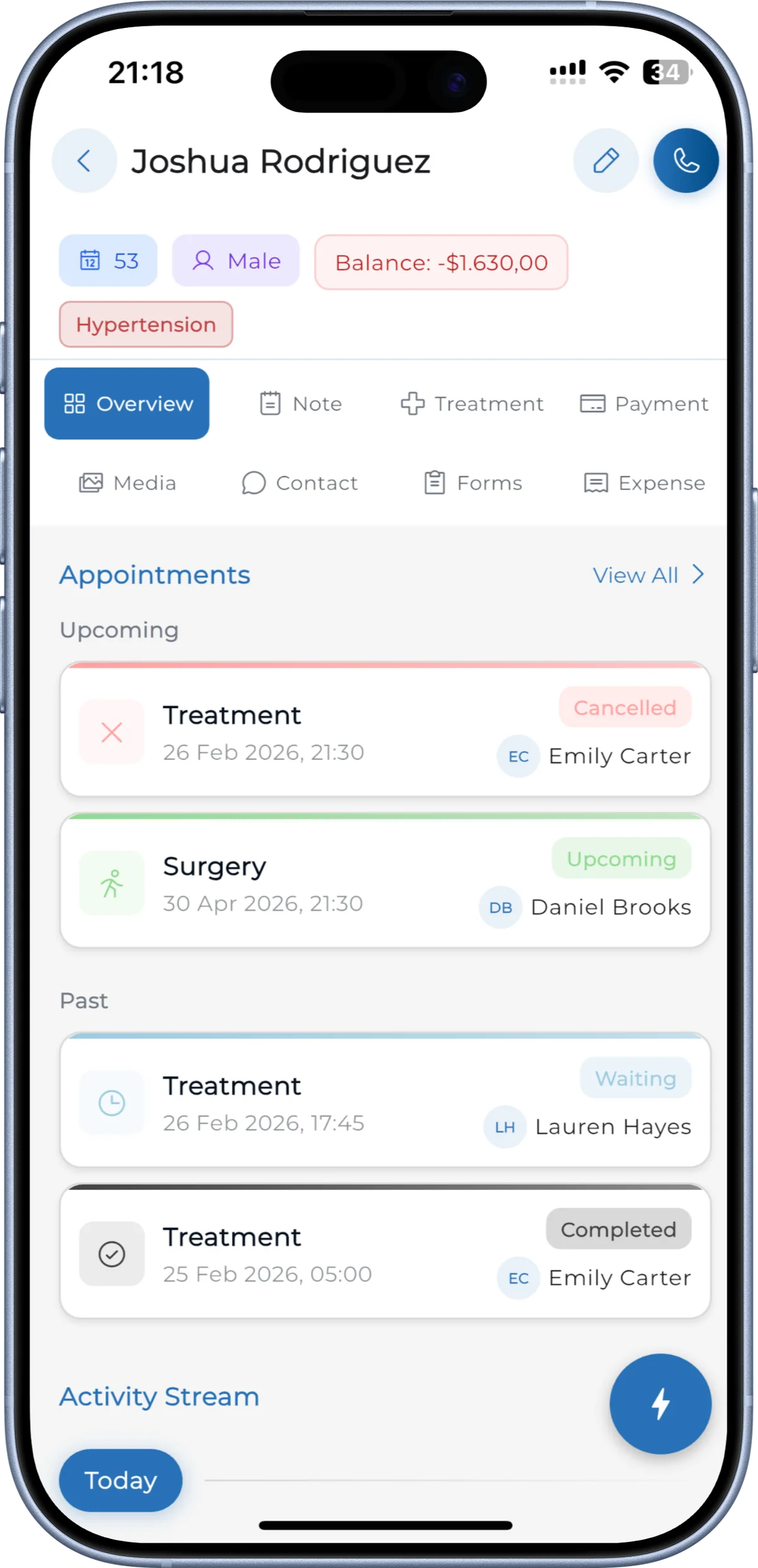
✨ A Clearer and More Comprehensive Patient Page
The patient page has been significantly improved.
Appointment history, upcoming treatments, financial status, and activity timeline are all brought together in one place. When you open a patient profile, you see everything you need.
What Has Changed Overall?
With this update, Medicasimple Mobile takes its already strong foundation one step further.
It delivers a smoother, faster, and more comprehensive experience for daily use. With fewer clicks, simpler flows, and quicker actions, mobile usage becomes significantly more efficient.
Have feedback on this update?
Tell us what would make this product change more useful for your clinic. We route feedback to the product team and use it to shape upcoming improvements.
Related product updates
More product updates
September 2026
September 2026 Product Updates
September 2026 brings automatic online booking approvals, updated estimates, AI clinical note uploads, cash flow reporting, and new webhooks.
→August 2026
August 2026 Product Updates
August brings AI-assisted treatment translations, expanded data imports, patient profile photos, and practical improvements for everyday clinic work.
→July '26
July 2026 Product Updates
July brings a live patient-flow calendar, fully customizable PDF invoices, and powerful improvements for day-to-day clinic operations.
→